Field report · 2026-11-26
How to Install Linger AI Agent on Linux (Tested with 0.1.10)
Page draft v2 — built entirely from a real installation run on 2026-11-26 (Debian 13, x64, 4-core CPU, 7.8 GB RAM, no GPU).
Every screenshot is our own capture from that run — including the parts that failed.
Facts verified 2026-11-26 · Linger Desktop 0.1.10
Short answer
Linger Desktop is distributed through GitHub Releases, not the official website (the download buttons on heylinger.com still say "Coming soon"). The Linux build is a 432 MB tar.gz. Extract it, run the linger binary, and the setup wizard takes a few minutes. You must connect an agent runtime — Claude Code by default, or Codex, Pi, or your own API key (BYOK). Local models are only offered if your machine has an NVIDIA GPU or is an Apple Silicon Mac; on anything else the wizard tells you up front that no local model fits, and you run on a cloud runtime instead.
Step 1 — Download the installer from GitHub Releases
- Release:
desktop-v0.1.10(published 2026-11-26 06:41 UTC) - File:
Linger-0.1.10-linux-x64.tar.gz— 432,165,408 bytes - The same release also has a macOS Apple silicon
.dmg(signed and notarized), a Windows x64 setup.exe, and a portable.zip.
Verify the download against the official checksums before running anything:
sha256sum Linger-0.1.10-linux-x64.tar.gz
# a1bd72a6f26ef3426a2ed3d8c70e46eb44b9e736e7a631e37976895e160fe479
Our file matched SHA256SUMS.txt from the same release exactly.
Step 2 — Extract and launch
tar xzf Linger-0.1.10-linux-x64.tar.gz
cd Linger-0.1.10-linux-x64
./linger
The extracted app is about 806 MB. It is an Electron app; on Linux it needs glibc 2.35+ (our test box runs glibc 2.41 on Debian 13). Under the hood the app serves its interface locally — the window title reads "Linger · localhost:3000".
Step 3 — First launch: the setup wizard
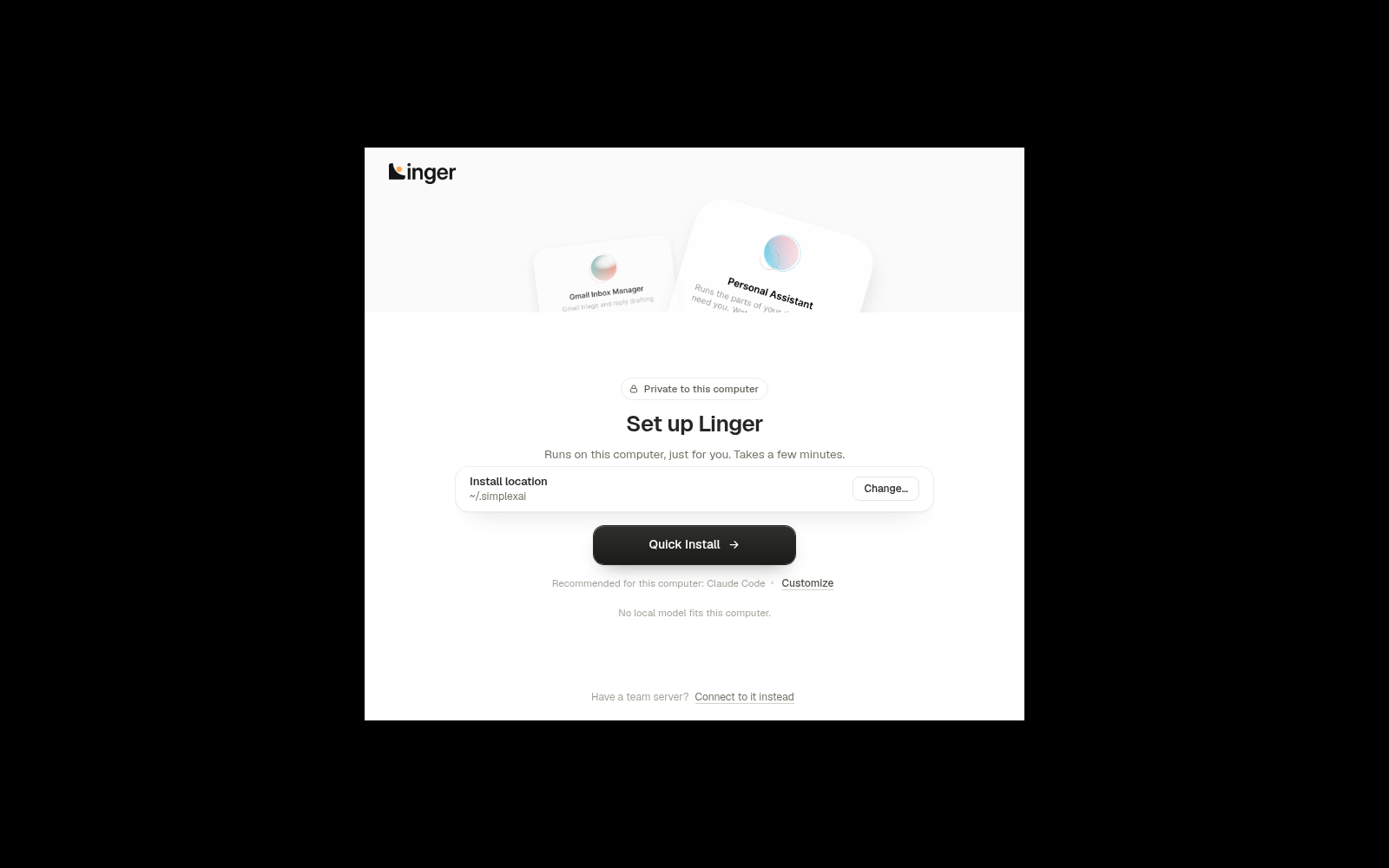
The first screen is Set up Linger:
- Install location defaults to
~/.simplexai(Change… lets you pick another folder; the wizard checks folder access and free disk space first). Budget real space: after setup,~/.simplexaiheld 1.3 GB on our machine. - Quick Install is the default path. Under it, the wizard shows what it recommends for your machine. On our GPU-less test box it read: "Recommended for this computer: Claude Code" — and, bluntly, "No local model fits this computer."
- A Customize link lets you pick a different runtime up front, and "Connect to it instead" joins an existing team server instead.
Step 4 — Quick Install runs five steps
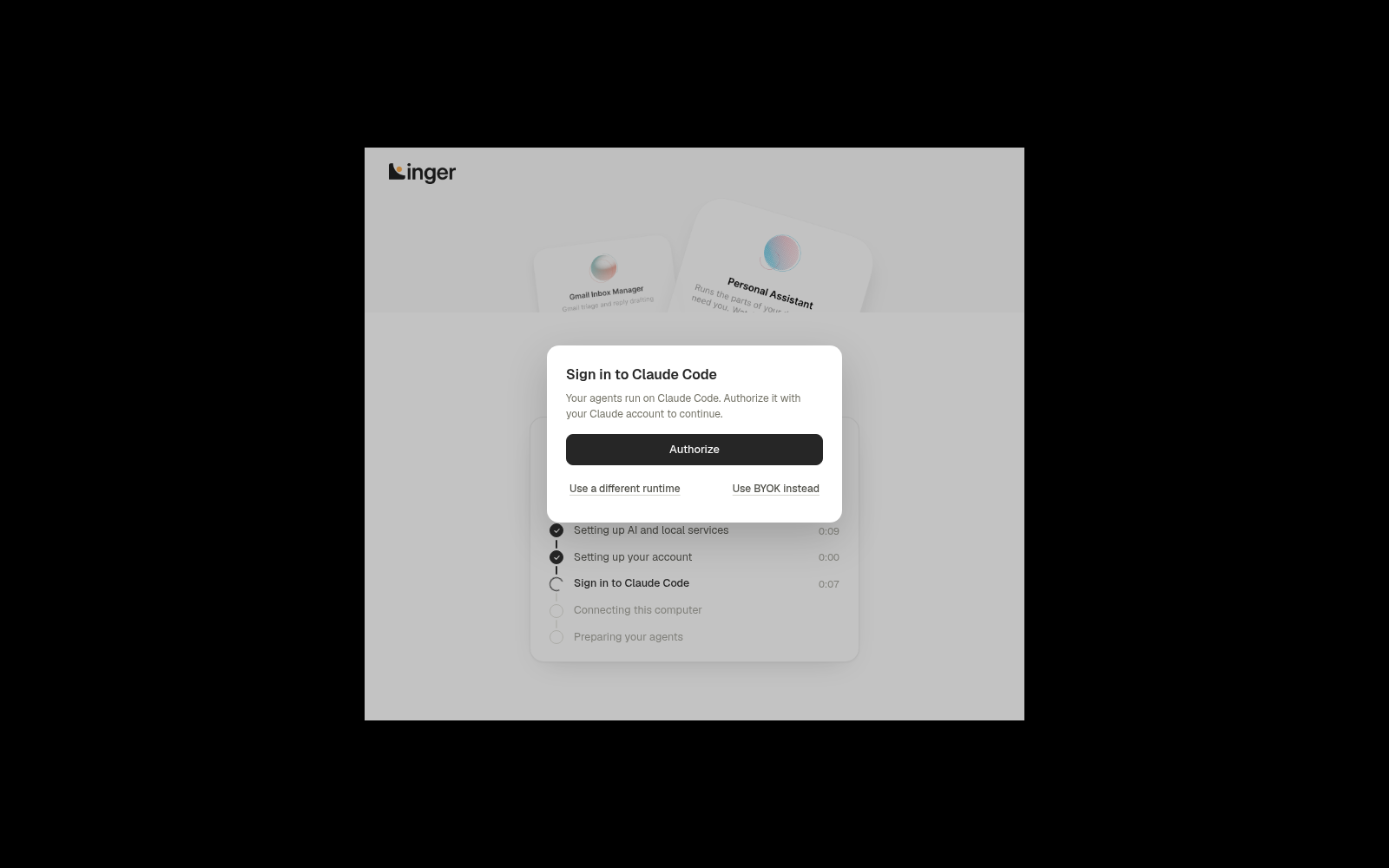
The wizard works through a visible checklist:
- Setting up AI and local services (0:09 on our box)
- Setting up your account
- Sign in to your runtime (Step 5)
- Connecting this computer
- Preparing your agents
Step 5 — Choose and authorize a runtime
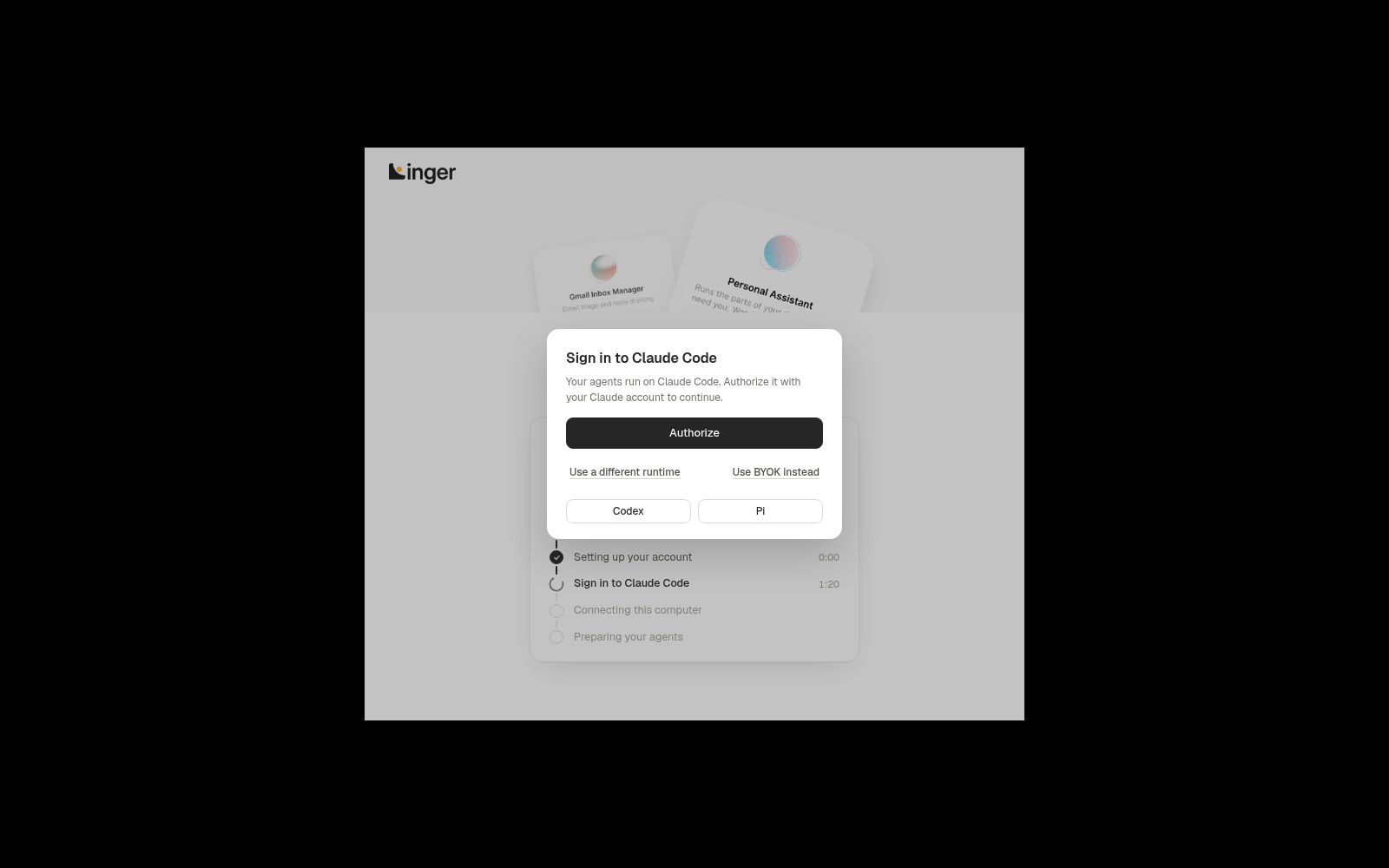
This is the one step that needs you personally — it connects Linger to your own AI account:
- Claude Code (default): "Your agents run on Claude Code. Authorize it with your Claude account to continue."
- Use a different runtime: Codex or Pi.
- Use BYOK instead: your own API key, stored privately on this computer.
What we used: BYOK with a Google Gemini key
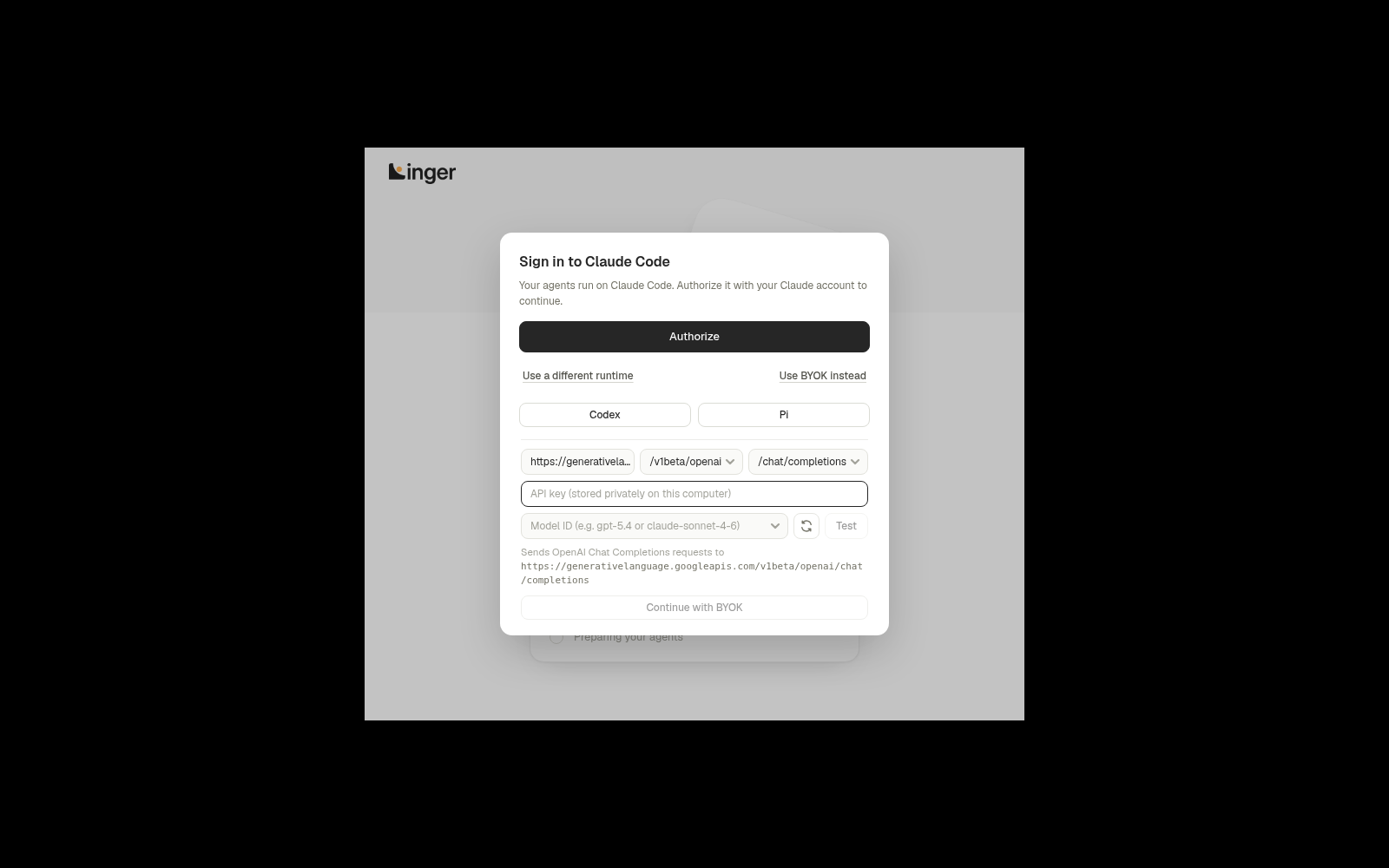
The BYOK form is more capable than it first looks — it composes Base URL + Path + Endpoint, and the Path menu has provider presets, including one labelled Gemini:
- Base URL:
https://generativelanguage.googleapis.com - Path:
/v1beta/openai(the "Gemini" preset) - Endpoint:
/chat/completions - Model ID:
gemini-3-flash-preview
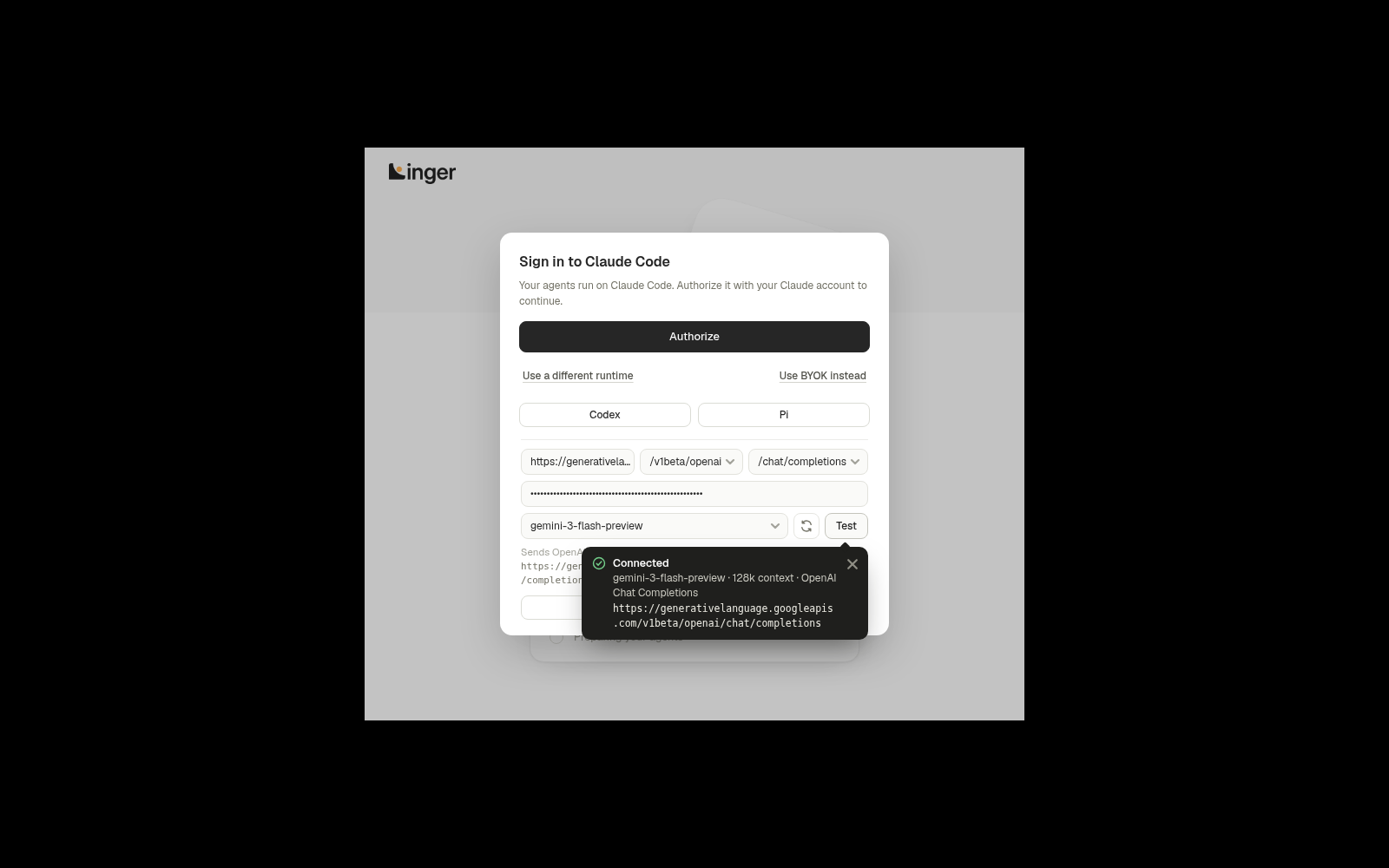
The built-in Test button confirms the connection before you continue — ours reported: "Connected · gemini-3-flash-preview · 128k context · OpenAI Chat Completions."
Two traps we hit so you don't have to:
- Older Gemini models 404 on newer API keys. With
gemini-2.5-flashthe test failed with "HTTP 404: the address or the model was not found." Calling the API directly shows why: Google returns "This model models/gemini-2.5-flash is no longer available to new users." Use a current model ID (gemini-3-flash-previewworked). - The Anthropic-format route is a dead end for Gemini. Composing
https://generativelanguage.googleapis.com/v1beta/messages(Path: none, Endpoint:/messages) also returned HTTP 404 in the test. Stick with the OpenAI-compatible preset above.
Step 6 — Setup finishes: "Linger is ready"
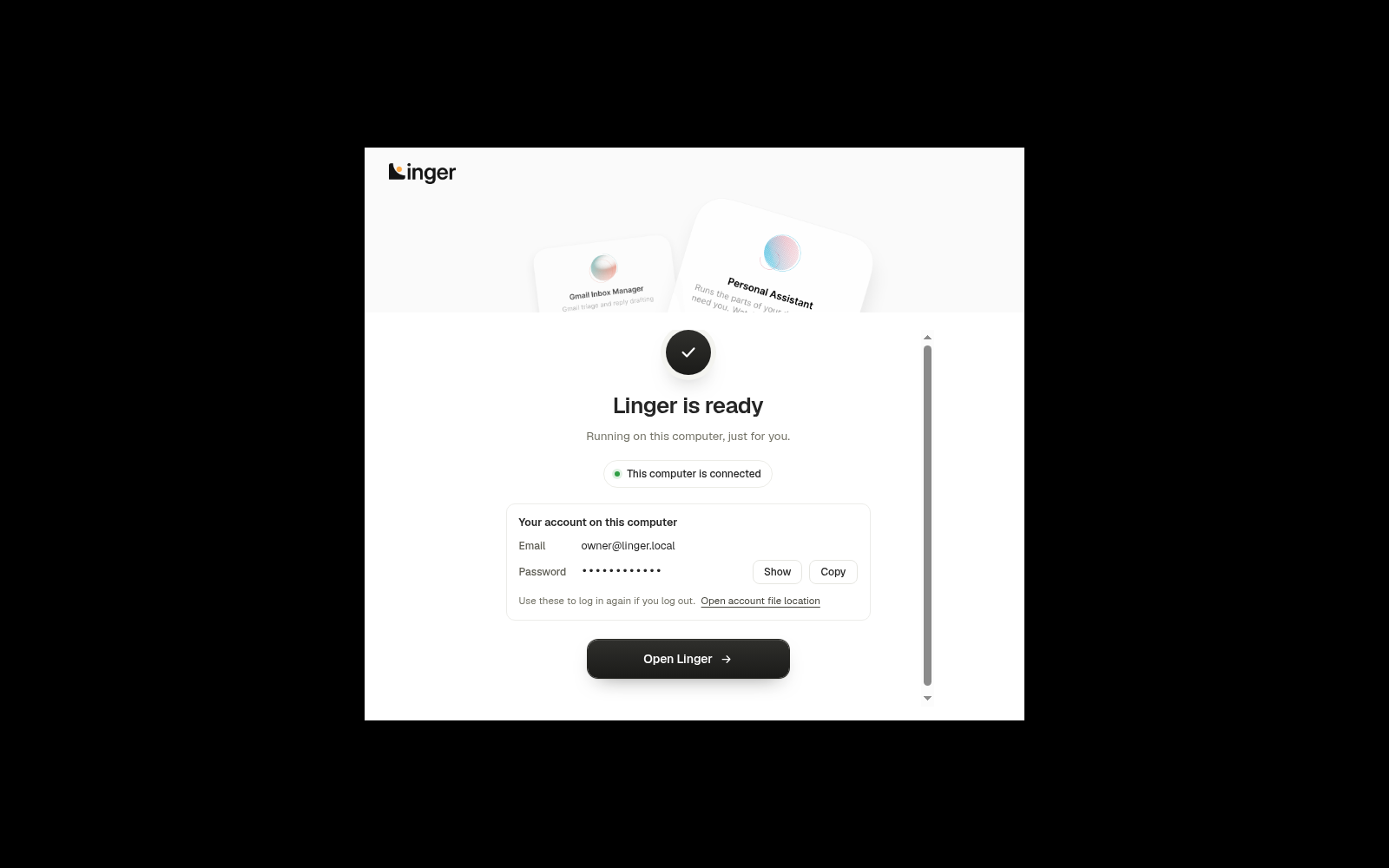
When the checklist completes, Linger shows "Linger is ready — Running on this computer, just for you" with a green "This computer is connected" badge. It also creates a local account for the built-in services (on our run: owner@linger.local with a generated password, shown once with Show/Copy buttons; the screen points you to the account file location for later logins). Click Open Linger.
Step 7 — The main window, first run
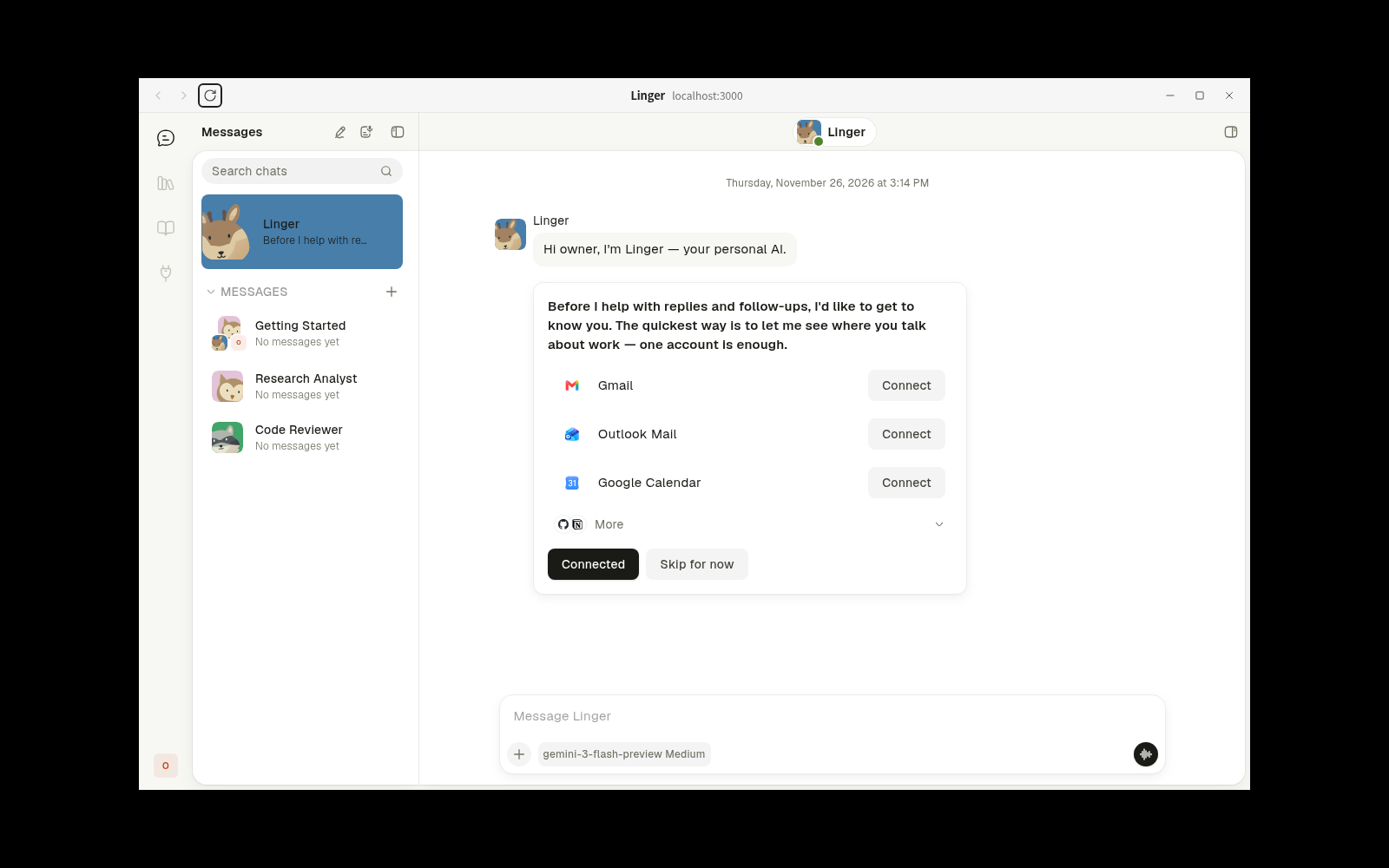
What you land in:
- A Messages workspace. The left sidebar lists your chats: Linger (the personal AI), plus starter agents Getting Started, Research Analyst, and Code Reviewer.
- Linger greets you ("Hi owner, I'm Linger — your personal AI") and starts a get-to-know-you onboarding: it asks to connect Gmail, Outlook Mail, or Google Calendar (with GitHub and Notion under "More") so it can help with replies and follow-ups. Every step can be skipped — we skipped, and it moved on politely ("No problem."), then asked for a portfolio/resume link, which can also be skipped.
- The message composer shows which model you're on — in our case a chip reading "gemini-3-flash-preview Medium" (the BYOK model, with a reasoning-effort level).
The local model catalog (Settings → Models)
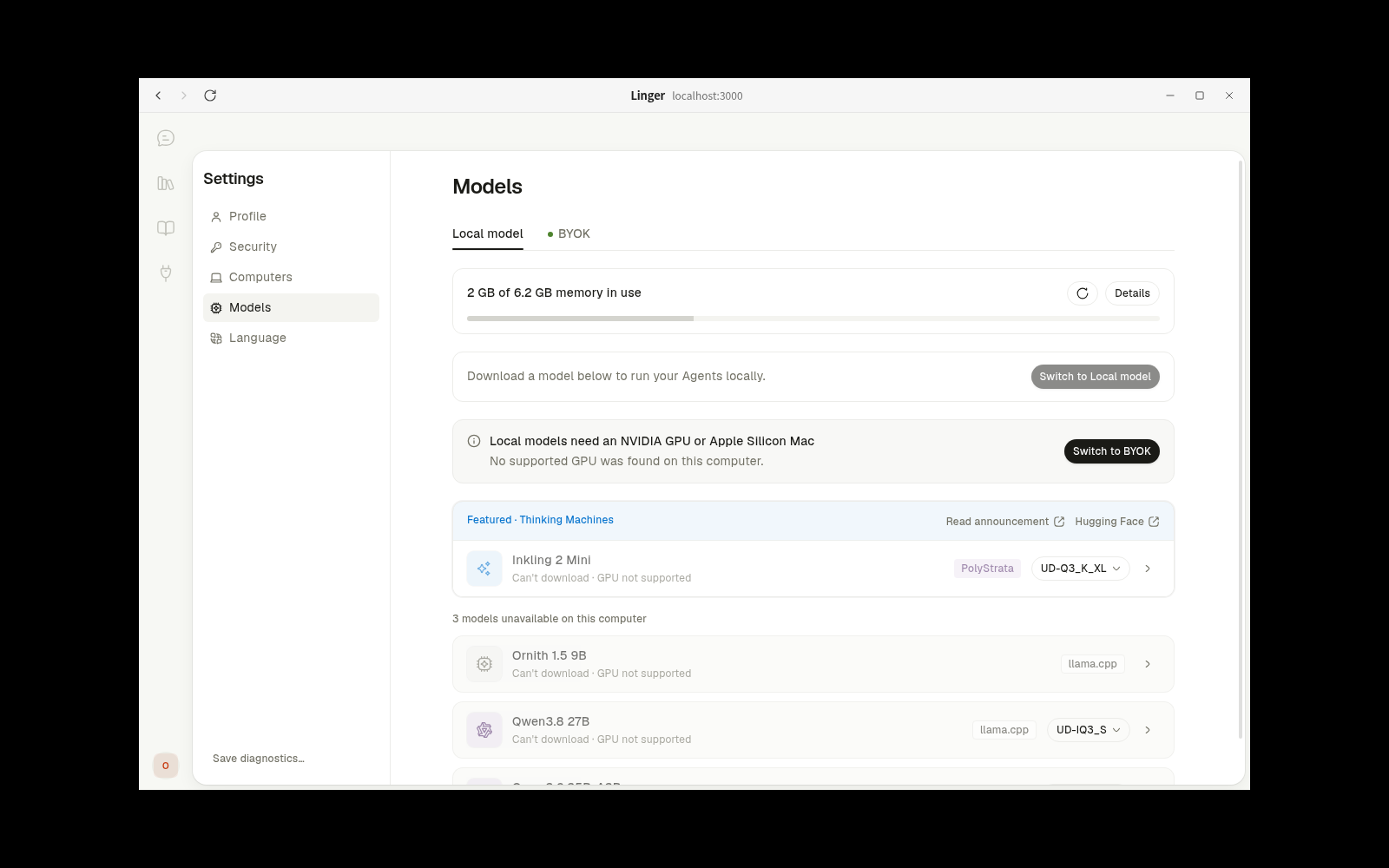
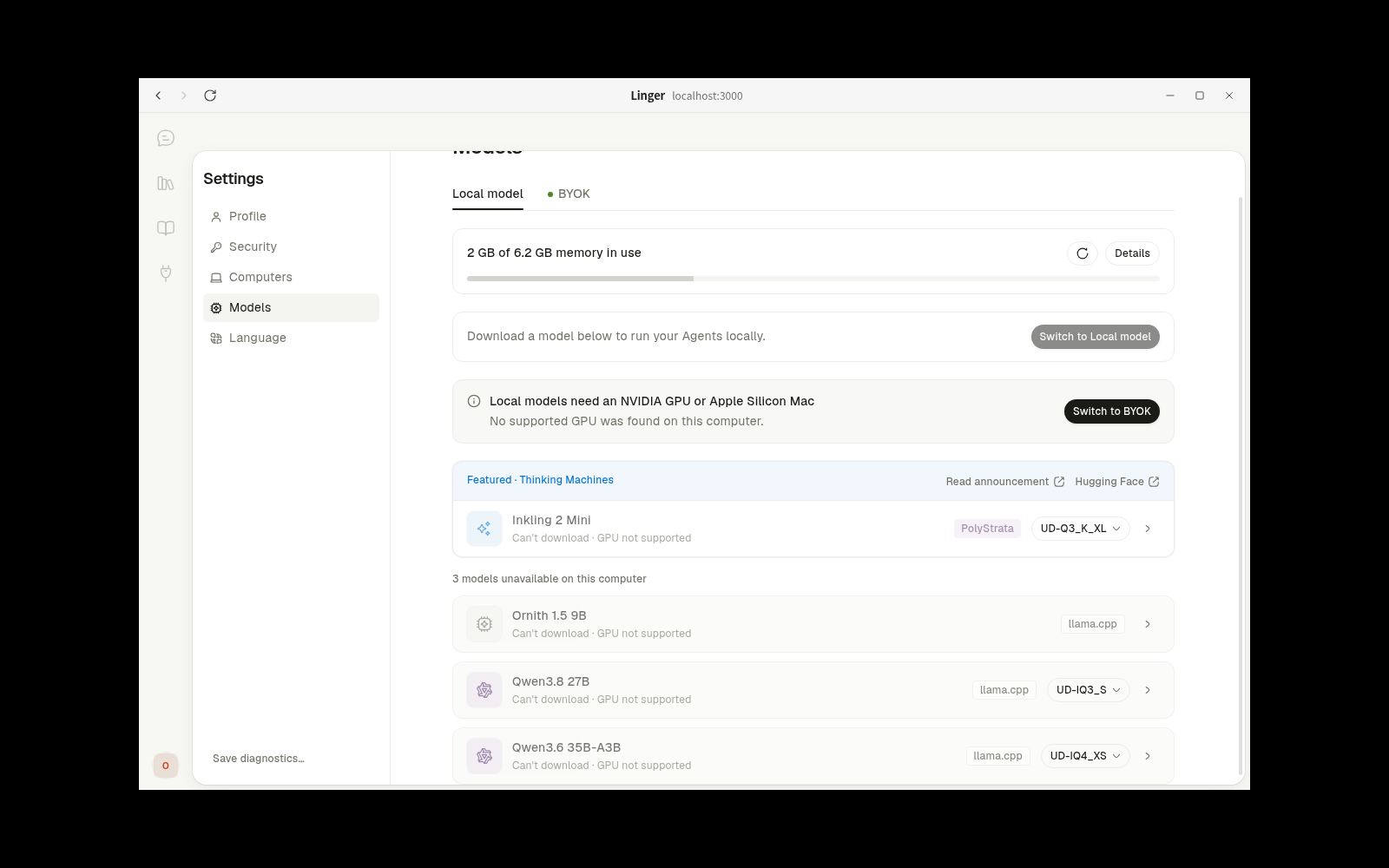
Settings → Models has two tabs, Local model and BYOK. On a machine without a supported GPU, the Local model tab is honest about it:
- A memory meter (ours: "2 GB of 6.2 GB memory in use").
- A banner: "Local models need an NVIDIA GPU or Apple Silicon Mac — No supported GPU was found on this computer", with a one-click "Switch to BYOK".
- The catalog itself, all marked "Can't download · GPU not supported":
- Inkling 2 Mini (featured, Thinking Machines) — PolyStrata engine, UD-Q3_K_XL quant
- Ornith 1.5 9B — llama.cpp
- Qwen3.8 27B — llama.cpp, UD-IQ3_S
- Qwen3.6 35B-A3B — llama.cpp, UD-IQ4_XS
On a GPU machine these rows get Download buttons instead; the download itself is a multi-GB GGUF pull per model. We could not capture a local download on this hardware — see the honest notes below.
The BYOK settings page
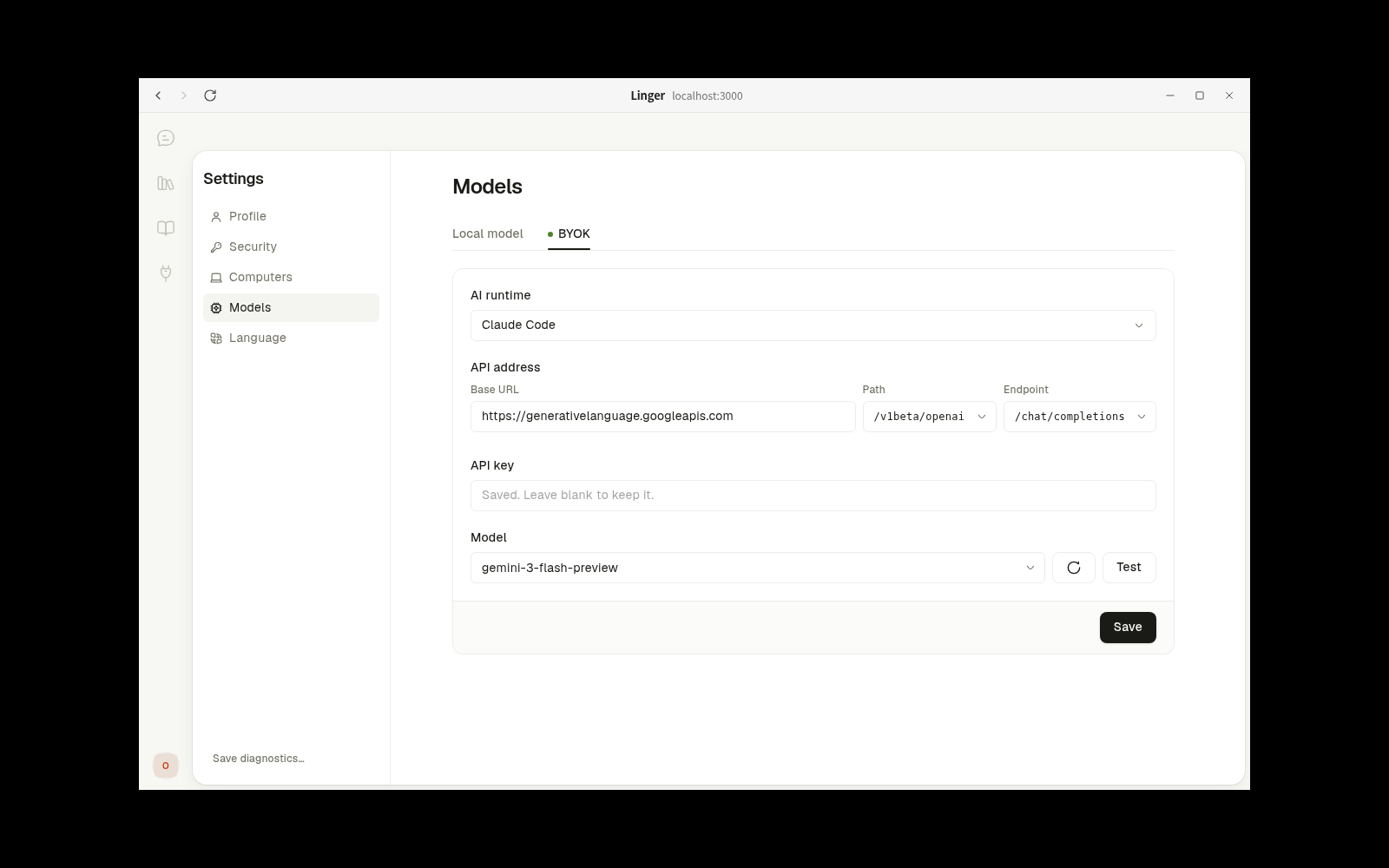
After setup, the same configuration lives in Settings → Models → BYOK: AI runtime (Claude Code), API address (Base URL / Path / Endpoint), API key ("Saved. Leave blank to keep it."), and Model with Test and Save. This is where you change providers later.
Honest notes from our test run — including what failed
- Test machine: 4-core CPU, 7.8 GB RAM, no GPU, Debian 13 — deliberately below the hardware tier Linger advertises for local models (12 GB GPU and up). Everything above is what actually happened on it; nothing was staged on a high-end rig.
- What worked: download and checksum verification, install, the full setup wizard, BYOK connection to Gemini (test: Connected), the main UI, the onboarding flow, the Settings pages, and the local-model catalog logic.
- What did not work — full agent runs over BYOK. Sending a real chat message ended with "Couldn't finish. Its AI app stopped with an error." Linger's own service log (
~/.simplexai/instances/desktop/native/logs/node-services.log) shows why: agent runs execute on the bundled Claude Code runtime (v2.1.288) and the run died withapi_error, statusCode 400against the BYOK endpoint — even though the same endpoint passes Linger's connection test and answers direct API calls. In plain terms: as of 0.1.10, a Gemini BYOK key is enough to connect, but the translated agent payload (tools and all) gets rejected by Google's OpenAI-compatible layer. If you plan to drive Linger with BYOK, budget for this: the subscription runtimes (Claude Code / Codex sign-in) are the path the product is clearly built around, and BYOK agent runs may need a provider whose API accepts the full agent request shape. We will re-test this on the next release and update this page. - Version pace: Linger shipped 0.1.9 on Nov 25 and 0.1.10 on Nov 26. Screenshots and version numbers on this page are dated for that reason; the changelog currently only goes back two versions.
FAQ
Is Linger free to download?
Yes — the installers on GitHub Releases are free and the project is open source. Running agents uses whichever runtime you connect (your Claude/Codex subscription, or API usage under BYOK); local inference has no token cost.
Why does the official site say "Coming soon" if installers exist?
The website's download buttons aren't wired up yet; the working installers are published on the GitHub Releases page of simplexai-labs/linger. The waitlist is for the launch announcement, not for the software itself.
Can I run Linger without a GPU?
You can install it and connect a cloud runtime or BYOK, but no local model will be offered — the wizard and Settings both tell you this up front ("No local model fits this computer" / "Local models need an NVIDIA GPU or Apple Silicon Mac").
Which Gemini model should I put in the BYOK Model ID field?
A current one. On a newer Google API key, gemini-2.5-flash returns 404 ("no longer available to new users"); gemini-3-flash-preview connected successfully in our test.